Showing posts with label Rogue Alerts. Show all posts

Wednesday, July 01, 2009

Somewhat new rogue Barracuda Antivirus gets wrath of legit Barracuda Networks

Another day, another rogue. This time it's named Barracuda Antivirus. I guess they wanted to ride the coattails of the real Barracuda firewall products. As usual, the fake Barracuda Antivirus will pop fake warnings and try to goad you into buying it.


The real Barracuda Networks had this to say:
This rogue ‘Barracuda Antivirus’ program is in no way affiliated with Barracuda Networks and is just one of a string of recent examples of hackers attempting to spread malicious programs using an established and trusted Internet security brand,” said Stephen Pao, vice president of product management for Barracuda Networks.

Barracuda is a successor to AntivirusBest. You can probably get rid of it with Malwarebytes Antispyware using the removal guide at Bleeping Computer for AntispywareBest. Screen shot of Barracuda Antispyware here.

More information about the real and legit Barracuda Networks here. They make hardware products to filter malware and spam for large networks, not really a home consumer solution.

Tuesday, June 30, 2009

AVProtection2009 Rogue

Saw an alert today about AVProtection2009. Like all rogue antispyware programs, it warns users about threats on their computer, which are usually false. It runs a somewhat real looking scan. After the scan, the program will offer to remove the threats if you purchase it.


Not too many details yet except what's at the Panda link above.

Thursday, December 11, 2008

Antivirus 360 Replaces Antivirus 2009 As New Rogue

The Vundo trojan is now using Antivirus 360 in it's effort to scam money out of victims. The name is play off of Norton 360 it appears. Like all rogue antispyware products, the malware that found it's way on your computer is from the same group that is trying to sell you the solution.

Antivirus 360 removal guide
found Bleeping Computer. Hijackthis log symptoms and files:

O4 - HKCU\..\Run: [13376694984709702142491016734454] C:\Program Files\A360\av360.exe

c:\Program Files\A360
c:\Program Files\A360\av360.exe
%UserProfile%\Application Data\Microsoft\Internet Explorer\Quick Launch\Antivirus 360.lnk
%UserProfile%\Desktop\Antivirus 360.lnk
%UserProfile%\Start Menu\Antivirus 360
%UserProfile%\Start Menu\Antivirus 360\Antivirus 360.lnk
%UserProfile%\Start Menu\Antivirus 360\Help.lnk
%UserProfile%\Start Menu\Antivirus 360\Registration.lnk

Wednesday, June 11, 2008

AntiSpyCheck Rogue Program

AntiSpycheck is a new rogue spyware program. It's installed by the zlob trojan, giving fake alerts that try to get you to purchase it. The zlob trojan disguises itself as a video codec that is supposedly needed to view a video. It really installs spyware to make fake alerts and installs AntiSpyCheck to trick you into buying it.

Here are some lines from Hijackthis that you may find if you are infected:

R1 - HKCU\Software\Microsoft\Internet Explorer,SearchURL = http://internetsearchservice.com
R1 - HKCU\Software\Microsoft\Internet Explorer\Main,Default_Search_URL = http://internetsearchservice.com
R1 - HKCU\Software\Microsoft\Internet Explorer\Main,Search Bar = http://internetsearchservice.com/ie6.html
R1 - HKLM\Software\Microsoft\Internet Explorer\Main,Search Page = http://internetsearchservice.com
R0 - HKLM\Software\Microsoft\Internet Explorer\Search,SearchAssistant = http://internetsearchservice.com
O2 - BHO: WarningBHO Class - {56FA7933-DC3E-403b-8D47-BB5E3F345A21} - C:\Program Files\AntiSpyCheck\IEWarning.dll
O2 - BHO: 514852 helper - {9420D9C5-E151-4D83-B9A6-27DE1A7A0E5F} - C:\WINDOWS\system32\514852\514852.dll
O2 - BHO: (no name) - {99BA268B-4021-4739-9945-3C774217FE75} - C:\Program Files\NetProject\sbmdl.dll
O4 - HKLM\..\Run: [AntiSpyCheck 2.1.0] "C:\Program Files\AntiSpyCheck\AntiSpyCheck.exe"
O4 - HKLM\..\Policies\Explorer\Run: [some] C:\Program Files\NetProject\scit.exe
O4 - HKLM\..\Policies\Explorer\Run: [start] C:\Program Files\NetProject\sbmntr.exe
O9 - Extra button: (no name) - {9034A523-D068-4BE8-A284-9DF278BE776E} - http://www.ietoolpro.com/redirect.php (file missing)
O9 - Extra 'Tools' menuitem: IE Anti-Spyware - {9034A523-D068-4BE8-A284-9DF278BE776E} - http://www.ietoolpro.com/redirect.php (file missing)
O22 - SharedTaskScheduler: campaniform - {5c7b71bb-6d49-4bdc-b60d-f9fe0481eb5f} - C:\WINDOWS\system32\kfcpnd.dll

Here are some files that you my have if you are infected with this trojan:

c:\Program Files\AntiSpyCheck
c:\Program Files\AntiSpyCheck\AntiSpyCheck.exe
c:\Program Files\AntiSpyCheck\IEWarning.dll
c:\Program Files\Mozilla Firefox\extensions\sotfone-tracker@sotfone.ru
c:\Program Files\NetProject
c:\Program Files\NetProject\sbmdl.dll
c:\Program Files\NetProject\sbmntr.exe
c:\Program Files\NetProject\sbsm.exe
c:\Program Files\NetProject\sbun.exe
c:\Program Files\NetProject\scit.exe
c:\Program Files\NetProject\scm.exe
c:\Program Files\NetProject\scu.exe
c:\WINDOWS\system32\kfcpnd.dll
c:\WINDOWS\system32\514852\514852.dll

For full details and a free removal guide, take a look at Bleeping Computer's AntiSpyCheck Removal Guide.

Friday, February 08, 2008

VirusHeat, Yet Another Rogue

The latest fake antispyware program is called VirusHeat. It does the usual fake warning ballon down by the clock telling you have spyware and other scary stuff. Luckily, it's not hard to remove, and the crew at Bleeping Computer have a VirusHeat removal guide.

SmitFraudFix can get this pest off your PC and it's free. So click the link above to see how to get this crap off your computer.


Here's what the fake warning looks like. It may say something different, but it's the same idea.

Friday, December 28, 2007

New Rogue - MalwareCrush

They don’t stop trying do they? I’ve just had a report about another new rogue that goes by the name of MalwareCrush.

MalwareCrush is a rogue anti-spyware program that uses aggressive advertising and is installed onto your computer through the use of Trojans and other malware. This software is typically installed on your computer when you download programs masquerading as a video codecs required to view a video on a web page. In reality, though, when you install these Trojans, they will instead show fake security alerts in your Windows taskbar and install MalwareCrush onto your computer without your consent.

Once MalwareCrush is installed, it will automatically start and scan your computer. When the scan is finished it will have found the malware that actually installed it in the first place, but will require you to purchase the software before you can attempt to remove it. This is obviously a scam and you should not purchase the software under any circumstances.

Removal guide and screenshots at Bleeping Computer

Tuesday, November 13, 2007

Zangcodec and Virus Protect 3.8

A codec is a little piece of software that is needed so that you can play or stream some video files.  Personally I’ve never had to install a codec.. but then I don’t do a lot with that medium.

One of the biggest problems around on the internet at the moment is the Zlob trojan (and variants of it), people get stung because they are told they need a codec to run certain adult material.   Once installed the victim is plagued with pop ups from some fake antispyware program or other and the computer becomes more or less unusable.

Recently the stakes have been upped a little and the Apple Mac platform has been targeted along with Windows.  The latest malicious codec site is  Zangocodec as reported by Sunbelt.

The latest rogue program seems to be Virus Protect 3.8 which was put on the Smitfraud list by S!Ri yesterday.  S!Ri is the author of Smitfraudfix and has been keeping this essential tool updated for the last three years or so.  Thank you S!Ri.

If you want a bit more information about zangcodec then click here.   If you need to know how to use the Smitfraudfix tool then click here.  But I do suggest that you ask for assistance at one of the fantastic anti malware sites that will not only help to get you clean but will give you some good technical advice on how to avoid these sort of infections in the future.   You can find a list of anti malware sites here.

Thursday, November 01, 2007

OSX Has It's Own Zlob DNSChanger OSX.RSPlug.A

Right before going to bed, I saw that there is a new variant of the all too familiar Zlob DNSChanger that has been infecting Windows computers for some 2 years now. The big change is it targeting Mac OS X instead of Windows. It does the same thing as the Windows versions that change your DNS to hijack your computer. It will redirect you to web sites you didn't mean to go to and your search results will also get sent to ones that the bad guys want you to see. That way,they can bombard you with ads and other garbage to try and get money out of you.

DNS is like a phone book. Your computer looks up what IP address a site like Google.com has. Since you are now using the fake phone book, when you click on a link or enter a web address, they send you to a similar web site. Usually, it has a lot of ads and links to other crappy websites. My experience with the Windows variants tends to be only a few redirects and then you are left alone for awhile. Also, unlike the zlob variant that tries to sell a fake antispyware program, you do not get pop ups and warning balloons that your system is infected.

The OS X version uses the same tactics to get you to install the trojan. A video gives you a warning that you need t install a codec or plug-in for Quicktime to view it. When you download the fake codec and try to install it, OS X will ask you for your admin password. This is one advantage that OS X has that most Windows users do not have. If you do not enter your password, then nothing bad happens. If you do enter your password, then you get hijacked.

Macworld has more details on this and how it can be removed. One of the first to report this trojan was Intego, who makes security software for MacIntosh computers.

Check in your Library folder (not the System/Library or your user Library) for a file called plugins.settings. The path to the file is:

/Library/Internet Plug-Ins/plugins.settings

Removing that file by itself won't fix the trojan. You need to do a little work in Terminal to remove OSX.RSPlug.A

1. In the Finder, navigate to /Library -> Internet Plug-Ins, and delete the file named plugins.settings. Empty the trash. This deletes the tool that sets the rogue DNS Server information.

2. In Terminal, type sudo crontab -r and provide your admin password when asked. This deletes the root cron job that checks the DNS Server settings. You can prove it worked by typing sudo crontab -l; you should see the message crontab: no crontab for root.

3. Open your Network System Preferences panel, go to the DNS Server box, and copy the entries you can see to a Stickies note, TextEdit document, or memorize them. Now retype those same values in the box, then click Apply.

4. Reboot your Mac.


For the most part, this is more of an annoyance. The main danger comes if you go to a website and enter personal information that the crooks want. They could redirect you to a website that isn't really your bank or Pay Pal and steal your login information. Although it seems now that it is mainly to send you to websites to peddle programs and display ads for you to click on.

Saturday, October 13, 2007

Bad Kitty

Websense® Security Labs™ are warning of a new website that is being spammed out by those behind the Storm Worm attacks.

This site poses as a free Ecard Web site. Users with unpatched computers are automatically exploited. Users with patched computers are prompted to download and run a file called “SuperLaugh.exe.” This file contains the Storm payload code.

Sample email text:

View your Kitty Card now! (URL REMOVED)

Go to Websense to see a screenshot of the website.

I haven’t had one of these yet… but I suppose it’s only a matter of time.

Saturday, July 21, 2007

Ransom-ware Trojan is Back

This summary is not available. Please click here to view the post.

Saturday, May 05, 2007

Windows Genuine Advantage Phish

Symantec have recently published a report about a Trojan called Trojan.Kardphisher. It will try to fool the unsuspecting victim into believing that Microsoft is requesting re-activation of your copy of Windows and to do this you have to supply credit card details.

Lets get one thing straight.... Microsoft does NOT request credit card information for WGA activation, or any other activation that I'm aware of. Please don't get caught out by this, keep your anti virus and anti malware programs up to date and run regular scans, if you need help then there is a list of sites that can help you here.

Thursday, March 08, 2007

Woman Gets Ripped Off By Winfixer, Sues Them To Get Money Back

Last September, Beatrice Ochoa paid for Winfixer to get rid of the spyware and pop ups. When Winfixer didn't help, she contacted their support. It was never available. When she started getting more advertisements from VipFares.com, enough was enough. Beatrice hired a lawyer and started a class action lawsuit.

Copy of a news story from KTVU Channel 2 posted at Youtube. I couldn't find a copy on the KTVU website. It's worth watching to see how the Winfixer crooks are making tens of thousands of dollars by putting malware on your computer.

Here's a link to the blog from the lawyer about the case. Here is a great write up of information at Spyware Sucks from a few days ago. It has links and instructions on how to find the case on the Santa Clara Superior Court website. You need to search for case 106CV072057 to check the status. There's also some info about Vipfares.com and Mark Cohen, who is one of the people sued by Beatrice's lawyer.

Tuesday, February 20, 2007

Windows Live Messenger Serves Up Winfixer and ErrorSafe

As reported by fellow MVP Sandi Hardmeier at Spyware Sucks (bookmark it), malware known as Winfixer or Errorsafe has been distributed via banner ads on MSN or Windows Live Messenger as it is now known. This has been reported to Microsoft who released the following statement.

"Microsoft was notified of malware that was being served through ads placed in Windows Live Messenger banners. As a result of this notification we immediately investigated the reports and removed the offending ads, as this is a violation of our ad serving policy. We can confirm that the ads are no longer being served by any Microsoft system. We apologize for the inconvenience and are reviewing our ad approval process to reduce the chance of an occurrence such as this happening again. To help customers protect their PCs from malware threats, Microsoft recommends customers follow our Protect your PC guidance at www.microsoft.com/protect." - Whitney Burk, Microsoft.


With internet advertising being the main source of revenue for a lot of sites these days, this sort of thing is becoming all to common. One of the best ways to protect yourself is to install a good hosts file which will block known bad sites.

Please make sure you read all of Sandi's report, as usual she has done a very thorough investigation and gives some sound advice about avoiding infection from rogue sites.

Monday, February 12, 2007

SpyDawn Rises As Newest Rogue Antispyware Program

SpyDawn has been reported by Bleeping computer as the newest fake antispyware program. Removal instructions have been posted as well as screen shots, including the pop up warning by the clock. The web page spydawn.com should be added to all the security black lists soon.

Here is the spydawn.com domain information. IP location is in the Ukraine with Inhoster Hosting company. The domain is registered through Estdomains. Both bad signs.

Registration Service Provided By: ESTDOMAINS INC
Contact: +1.3027224217
Website: http://www.estdomains.com

Domain Name: SPYDAWN.COM

Registrant:
ODS ltd
Robyn Turner turnrobyn@gmail.com
Level 11 Toowong Tower
9 Sherwood Road
Toowong
null,Qld 4006
AU
Tel. +61.38761200

Creation Date: 12-Nov-2006
Expiration Date: 12-Nov-2007

Domain servers in listed order:
ns3.dragracers.biz
ns2.dragracers.biz
ns1.dragracers.biz


Administrative Contact:
ODS ltd
Robyn Turner turnrobyn@gmail.com
Level 11 Toowong Tower
9 Sherwood Road
Toowong
null,Qld 4006
AU
Tel. +61.38761200

Technical Contact:
ODS ltd
Robyn Turner
Level 11 Toowong Tower
9 Sherwood Road
Toowong
null,Qld 4006
AU
Tel. +61.38761200

Billing Contact:
ODS ltd
Robyn Turner
Level 11 Toowong Tower
9 Sherwood Road
Toowong
null,Qld 4006
AU
Tel. +61.38761200

Status:ACTIVE

SpyCrush Is Another Fake Antispyware Program

I've been busy with real life and haven't posted much over the last few months, but the bad guys have been busy. SpyCrush is the latest in the line of fake spyware removal programs that try to trick you into buying it. The same people who make the program are the ones who put the spyware on your computer. Other programs like this include SpywareQuake, SpyFalcon, SpywareStrike, SpySheriff and many others.

Besides the pop up warnings and other advertising trying to get you to buy it, you'll see this line in a Hijackthis log:

O4 - HKLM\..\Run: [SpyCrush] C:\Program Files\SpyCrush\SpyCrush.exe

Smitfraudfix has been updated to remove this pest, so you can use the removal instructions here. Alternative fix is posted at Bleeping Computer. Information about spycrush.com and how the program SpyCrush resembles and older rogue VirusBurst located at Security Cadets.

Monday, December 18, 2006

Mr Clean in the Spyware Business now?

The latest fake antispyware program, Mr Antispy, looks familiar. It seems the spyware makers ran out of ideas and ripped off Mr Clean, the household cleaner. The only thing that will get cleaned by Mr Antispy will be your wallet if you buy it. Comparison picture included in link.

It should go without saying that you shouldn't buy this program. It's made by the same people who brought us SpyAxe, SpyFalcon, SpywareStrike, MalwareWipe, Pest Trap, and many other rogue programs. The registration for mrantispy.com is done by ESTDOMAINS who is associated with all of those fake programs. If any Proctor & Gamble lawyers come across this, why not give them a call at 1.3027224217

Digg it

Tuesday, December 12, 2006

MalwareWiped a New Rogue Program

While looking at some web sites, I came across a new rogue antispyware program, Malwarewiped. If that sounds familiar, then that's because it's a renamed copy of MalwareWipe. The website name is Malwarewiped.com, which is not much different than the old one, malwarewipe.com.

This program is advertised by trojans and other malware to try to trick you into buying it. My copy got downloaded by clicking a fake warning from updatestate.com. Avoid this program, it's not worth paying for. Especially when most people will have it installed on their computer by spyware and trojans.


McAfee Antivirus detects it as a potentially unwanted program. Other security programs will add it to their detections soon I'm sure.

New Scam Sites

Several new scam websites found by Sunbelt Software and posted on their blog. These sites use different tricks to get people to install software. Don't download or install anything from them or anything else advertised this way.

Details and screen shots at Sunbelt Blog.

IP: 85.255.117.196
activexmediaobject.com

IP: 85.255.117.194
multimediaobject.com

IP: 85.255.116.210
iesafetywarning.com

IP: 85.255.116.210
uptodateprotect.com

IP: 85.255.116.212
allsecuritysite.com

Monday, September 04, 2006

Spyware Pop Ups This Week

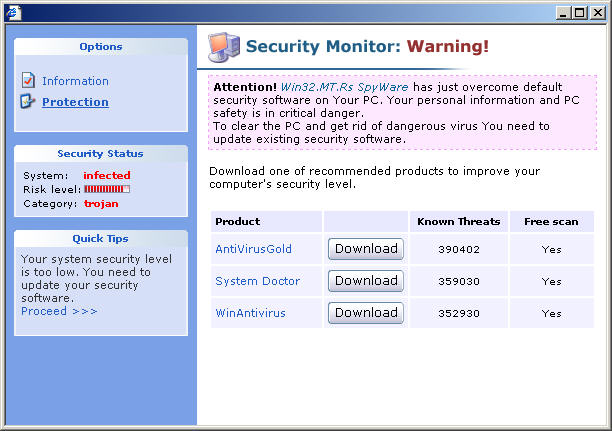
I was testing one of the newer codecs that installs spyware, and thought I would share some of the pop ups it will put on your system. One of the things I found out was that VirusRescue is still out there and is being promoted through pop ups.

I was at a web site and was offered a video to watch. I couldn't see it and was told that I needed a codec to properly watch it. I knew this was going to install something unwanted, so I prepared to get infected with spyware on my test computer.


After installing the fake codec, I received the pop up above after a few minutes. Knowing I had installed a trojan, it was no surprise that I had a trojan that the pop up was warning about. All of the info in the pop up is made up. Nothing was actual scanned or confirmed to make the report in it. They already knew the computer was infected since that is the way the scam is set up.

Clicking the update security button changed the to what is on the left. The only way to solve the problems that the computer has now is to download one of the programs listed. AntiVirusGold, System Doctor, and WinAntiVirus are all known rogue programs. For now, I decided to not download anything and see what other pop ups I might get.

I got some other pop ups and alerts while waiting for something new to come up. Some were similar to ones I posted about earlier in my fake warnings from spyware post. I commented in that post about the English used in some of the fake warnings. This trend continues with latest one, VirusBurst. The warning balloon mention that clicking the warning will help you. They misspelled balloon like this: baloon. You can see this at Bleeping Computer's report about VirusBurst.

After awhile, I saw a familiar one. This pop up is made to look like it is part of Microsoft's Live OneCare. It's a bit out of date now, since Microsoft changed the look of their site some. Still, it's trying to dupe people into thinking it is from Microsoft or at least affiliated with them.

People who have used or been to Live OneCare may remember that and just assume this one is part of that. Unfortunately, it is not and is probably why this pop up was made. I decided to click on this one and see what it would do.

Clicking on the fake live op up took me to the home page for VirusRescue. What a surprise I thought. Since I already tested this rogue earlier, I didn't bother to download it. You can see my report on VirusRescue in an earlier post. They did redo the home page to make it look different, but it's still a scam. It doesn't have anything to do with OneCare or Microsoft. It's just a trick to get people to buy it.

If you do have any of the pop ups, fake alerts, or programs mentioned in this post, try following the free virus and spyware removal instructions I posted about.

Thursday, August 31, 2006

VirusBurst, Another Fake Spyware Program

While I was posting about SiteAdvisor in my earlier posts today, Bleeping Computer announced they found yet another fake antispyware program, VirusBurst. While the name is different, it looks pretty much the same as SpywareQuake to me.

Looking at the registration info for VirusBurst.com, I can see the usual suspect is involved with this site as well. Estdomains is the registration provider. They seem to always be near questionable programs and websites.

Registration Service Provided By: ESTDOMAINS INC
Contact: +1.3027224217
Website: http://www.estdomains.com

Domain Name: VIRUSBURST.COM

Registrant:
Burst Technology GesmbH
Judi Stewart (Whois Privacy and Spam Prevention by Whois Source)
Davidgasse 87
Vienna
null,A-1100
AT
Tel. +431.3365073

Creation Date: 10-Aug-2006
Expiration Date: 10-Aug-2007

I'm sure the above info contains fake information. Most of the time when these rogue programs are registered, the info is not real.

Bleeping computer reports that the following file is responsible for installing this pest. When it gets on your system, it will download VirusBurst and download software without permission.

C:\Windows\System32\eowygj.dll

You will see a warning balloon above the clock on your coputer. Right now they spell balloon wrong, baloon. If they can't get that right, makes you wonder what else they did wrong. Here's what it says:

"System detected virus activities. They may cause critical system failure. Please, use antimalware software to clean and protect your system from parasite programs. Click this baloon to get all available software.”

This is not the same one, but it looks like this one:


Right now, you can use the VirusBurst removal instruction at Bleeping Computer to fix this pest. More details as they become available. Update, S!ri's SmitFraudfix will now remove VirusBurst as well.

Edit to update: Here's some more info on Virusburst.com

VIRUSBURST.COM = [ 195.225.177.121 ]

Domain servers in listed order:
ns4.tokiodrift.biz
ns3.tokiodrift.biz
ns2.tokiodrift.biz
ns1.tokiodrift.biz

Right now, tokiodrift.biz is a SpyAxe download page, which is also a Rogue program. Here are other sites on the same IP address as tokiodrift:

1. almanah.biz
2. spyaxe.biz
3. spyaxe.com
4. spyaxe.net
5. spywarestrike.com

So I would say that VirusBurst.com is no good and so is the program VirusBurst.

OK, one more update. Paperghost at Vitalsecurity noticed the EULA for VirusBurst is the same one for SpywareQuake. They changed the main title, but eveything in the long wordy part says SpywareQuake. Look at the end of his post for this.